
We continue on with the build..
This is the second post in the series. In Part 1 we planned the product, picked Convex as the backend, and got the agent set up with persistent memory. This time we actually start building.
Where We Left Off
In Part 1 we treated HomeschoolHero like a real software project instead of jumping into code. We wrote the brief, chose the stack, and produced a 9-phase implementation plan. The promise was simple: turn that plan into a working app, one phase at a time, and write it up honestly as we go.
This post covers the first three phases:
Foundation : scaffolding Next.js 16, wiring Convex, proving a live database connection.
Data Model: designing the Convex schema (17 tables) and seeding the curriculum.
Student Portal MVP: building the dashboard to match our design mockup, plus the subject, lesson, quiz, and reward pages.
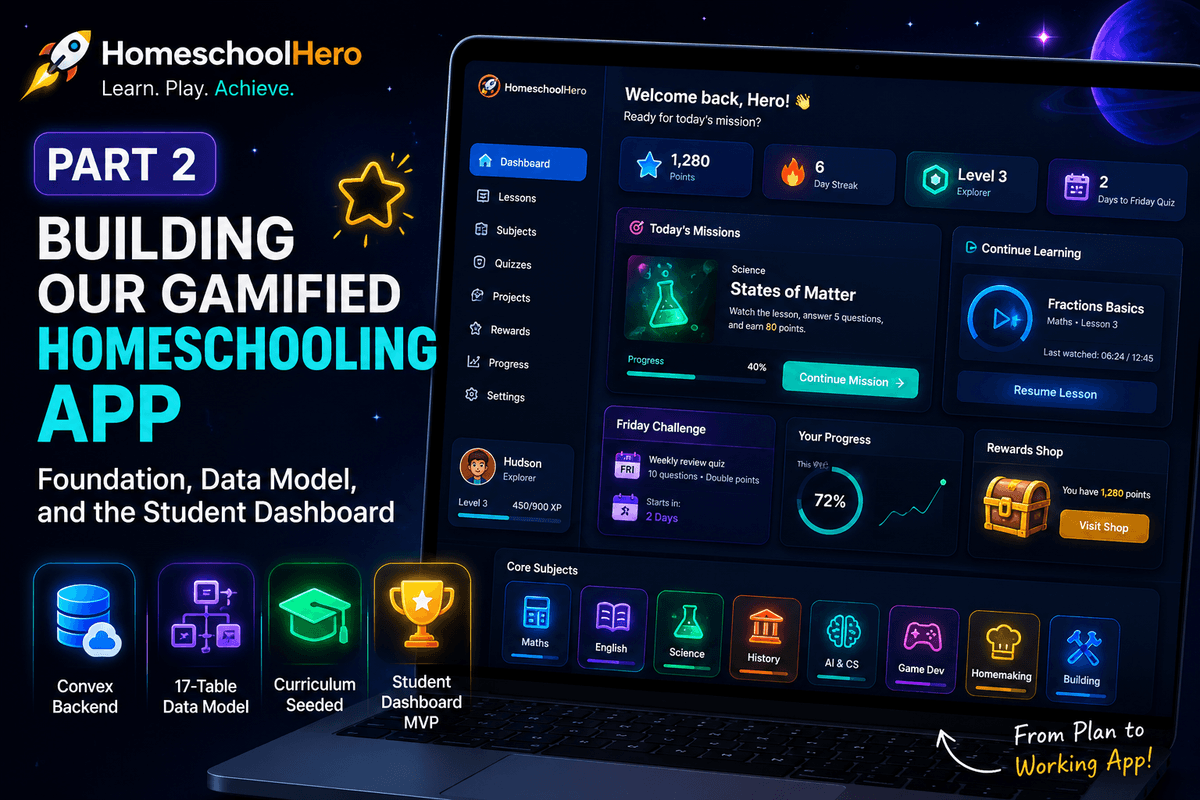
It got real this week. The app now runs in the browser, talks to a live cloud database, and the student dashboard looks like the premium, gamified learning space we set out to build.
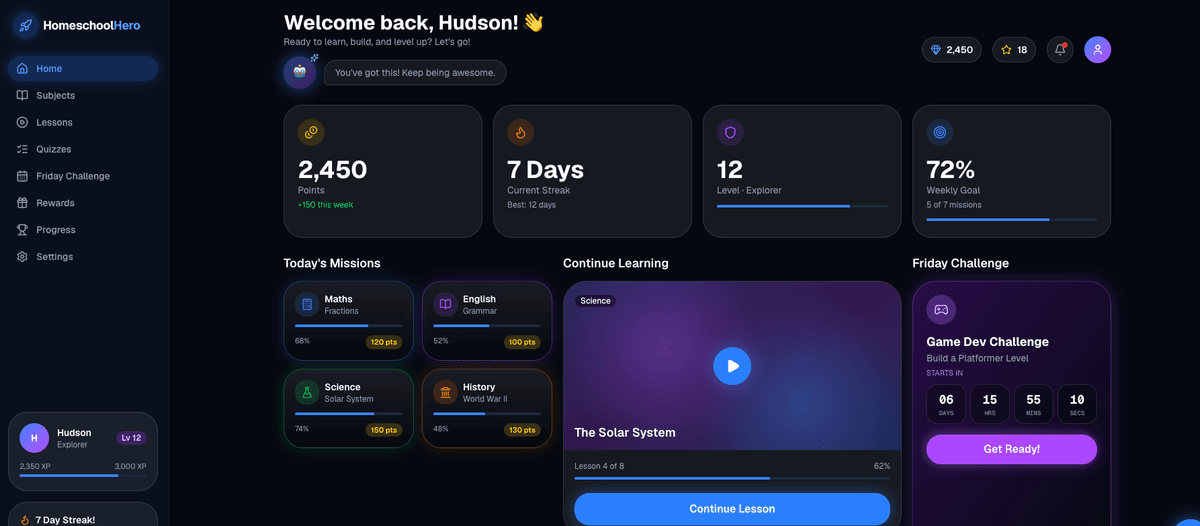
Figure 1: The HomeschoolHero student dashboard running locally: dark space theme, 4 stat cards, missions, continue learning hero, Friday countdown, and the Core Subjects grid, all live against Convex.
Step 1: Scaffolding the App (Phase 1 : Foundation)
We started with the boring but important stuff. The agent scaffolded a Next.js 16 app with TypeScript, Tailwind, the App Router, ESLint, and the @/* import alias. We added the libraries the plan called for: Convex for the backend, @convex-dev/auth for logins, lucide-react for icons, framer-motion for animation, and recharts for charts. We also initialised shadcn/ui and pulled in the primitives we knew we would need early: button, card, input, label, dialog, drawer, badge, progress, table, tabs.
A small surprise: Tailwind v4 changed the way themes work. Instead of a big JavaScript config file, tokens now live in CSS using @theme. That actually felt cleaner once we got used to it. We had the agent add our colour variables with the deep navy background, the neon subject colours, the glow shadows, all straight into globals.css, with a matching tailwind.config.ts kept as a reference document for the palette.
The interesting engineering decision here was auth. We are using Convex Auth, but in the current version the provider component is called ConvexAuthProvider, not the older ConvexProviderWithAuth name that shows up in some docs. We wired it through a small client Providers component in the root layout, which keeps the rest of the app server-first.
Step 2: Connecting the Live Database (and the smoke test gate)
The plan had a hard rule for Phase 1: do not move on until the app proves it can talk to the cloud database. We connected the project to our existing Convex deployment, added a tiny smoke-test query, and rendered it live on the home page.
convex run hello:hello → "HomeschoolHero online"
That one line was the gate. Until the page rendered real data from Convex, we were not allowed to start Phase 2. It sounds obvious, but having that rule stopped the agent from building UI on top of a backend that might not have been wired correctly.
I want to be honest about the bumps too. Connecting the Convex MCP (the bridge that lets the coding agent inspect the database directly) hit a stubborn auth loop. We diagnosed it, worked around it by verifying everything through the Convex CLI, and kept the build moving.
The lesson: pick the verification path that works and do not let one tooling bug block the whole project.
Step 3: Designing the Data Model (Phase 2 — Core Schema)
Once the connection was live, we designed the heart of the app: the database schema. Everything else depends on this being right.
We ended up with 17 tables, including the auth tables that Convex Auth manages for us. The application tables cover the full product: subjects, topics, lessons, quizzes, quizQuestions, quizAttempts, videoProgress, pointsLedger, rewards, rewardRedemptions, badges, studentBadges, the AI draft tables for later, and a single settings doc for the parent's AI keys.
A few decisions that matter:
Roles, not loose flags. We keep a
userProfilestable linked to the auth user, with aroleofparentorstudent. Every sensitive function will check that role server-side. A student can never pretend to be a parent by passing an argument.Indexes on every foreign key, plus composite indexes like
by_user_and_lessonfor video progress, so the dashboard queries stay fast as the data grows.No unbounded arrays. Quiz answers and points live in their own tables, not stuffed inside a single growing document. That is a Convex best practice and it will save us later.
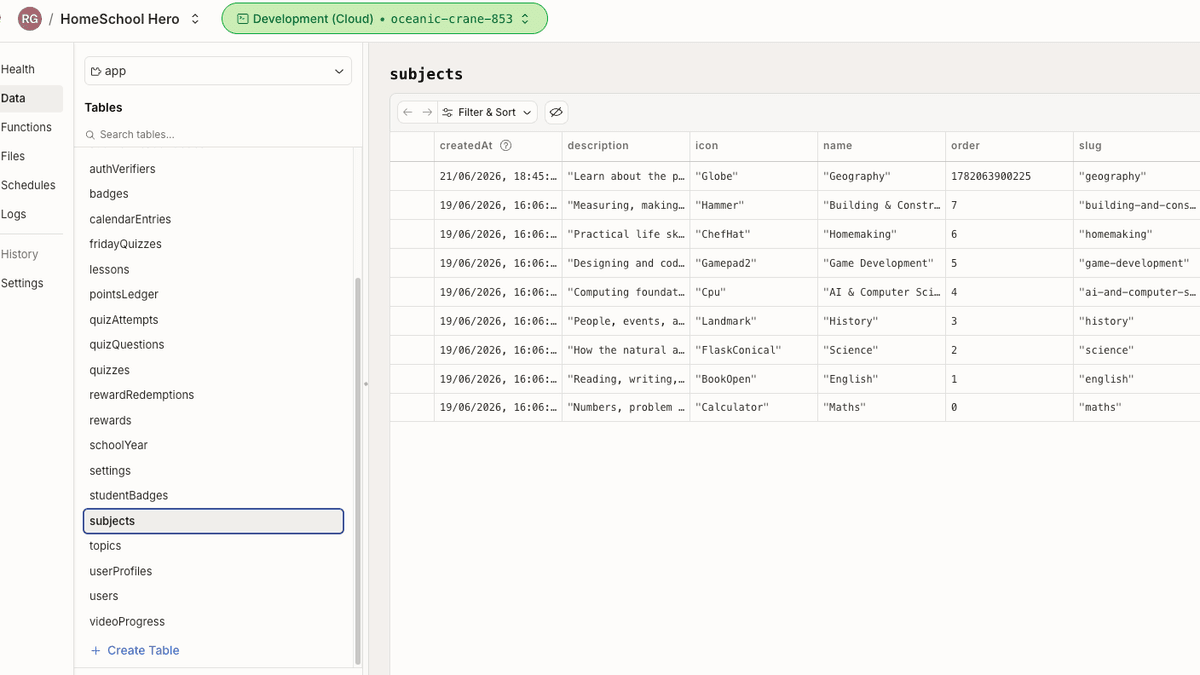
Figure 4: The Convex schema : 17 tables with the relationships that power lessons, quizzes, points, rewards, and progress.
We also wrote a one-off seed script that drops in the eight core subjects: Maths, English, Science, History, AI & Computer Science, Game Development, Homemaking, and Building & Construction, along with 39 starter topics. Each subject carries its own accent colour from the design system (Maths is blue, Science is green, History is orange, and so on), so the UI stays consistent everywhere.
Step 4: Building the Student Dashboard (Phase 3 — Student Portal MVP)
This is the fun part. The design skill we wrote earlier is the source of truth: a dark space theme, neon accents, rounded glass cards, soft glows, and copy that feels like a game rather than a school admin system. The dashboard had to mirror the mockup exactly.
We built thirteen reusable components first, then assembled the page from them:
A fixed sidebar with the rocket logo, eight nav items, a profile card (avatar, name, rank, level, XP bar), and a 7-day streak tracker with green ticks and an orange flame for today.
A header with the welcome message, the little AI mascot in a glowing orb saying something encouraging, and quick stats for points and stars.
Four stat cards across the top: Points, Current Streak, Level, and Weekly Goal.
A middle row with Today's Missions (four subject cards with their own coloured glows), a Continue Learning hero with a play button, and a purple Friday Challenge card with a live countdown timer.
A bottom row with an Overall Progress donut chart (Recharts), a 2×4 Core Subjects grid, Recent Achievements, and a Parent Insights link.
A footer with the Reward Shop strip, a Need a Hint? card that opens a help drawer, and a floating star button in the corner.
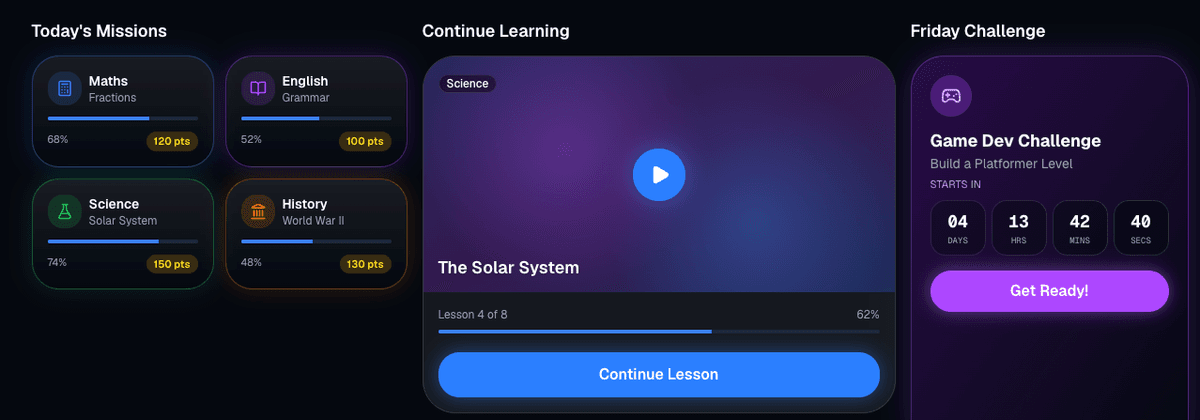
Figure 5: The middle row of the dashboard: Today's Missions with subject-coloured glows, the Continue Learning hero, and the Friday Challenge countdown ticking down in real time.
The Friday countdown is a nice example of the detail involved. It is a tiny client component that recalculates the time until Friday every second, with monospace digits so the numbers do not jump around as they change. Small touches like that are what make it feel like a game.
We also wired the parts that already have real data. The Core Subjects grid and the missions pull the live list of subjects from Convex, so the eight seeded subjects show up immediately. The numbers that depend on a logged-in student, points, streak, progress percentages, use placeholder values that match the mockup for now.
That is deliberate: the design skill says match the layout first, then wire live data. Once the student account is active, every one of those numbers will come from a Convex query.
Step 5: The Supporting Pages
The dashboard is the centrepiece, but a learning app needs the pages around it. We built:
Subjects: an index of all eight subjects plus a detail page per subject showing its topics, difficulty level, and completion state, all in the subject's accent colour.
Lesson page: with a real YouTube player island. This was a big one. Using the YouTube IFrame API, the player saves exactly where my son stopped watching, resumes from that timestamp next time, and reports per-second progress back to Convex. Hit 90% watched or reach the end and the lesson is marked complete.
Quiz flow: one question per screen, instant feedback with an explanation, a progress bar, and a results screen showing the score and points earned, with a retry button.
Reward shop: a grid of rewards with a points balance and a redeem button that checks the student actually has enough points before letting them spend.
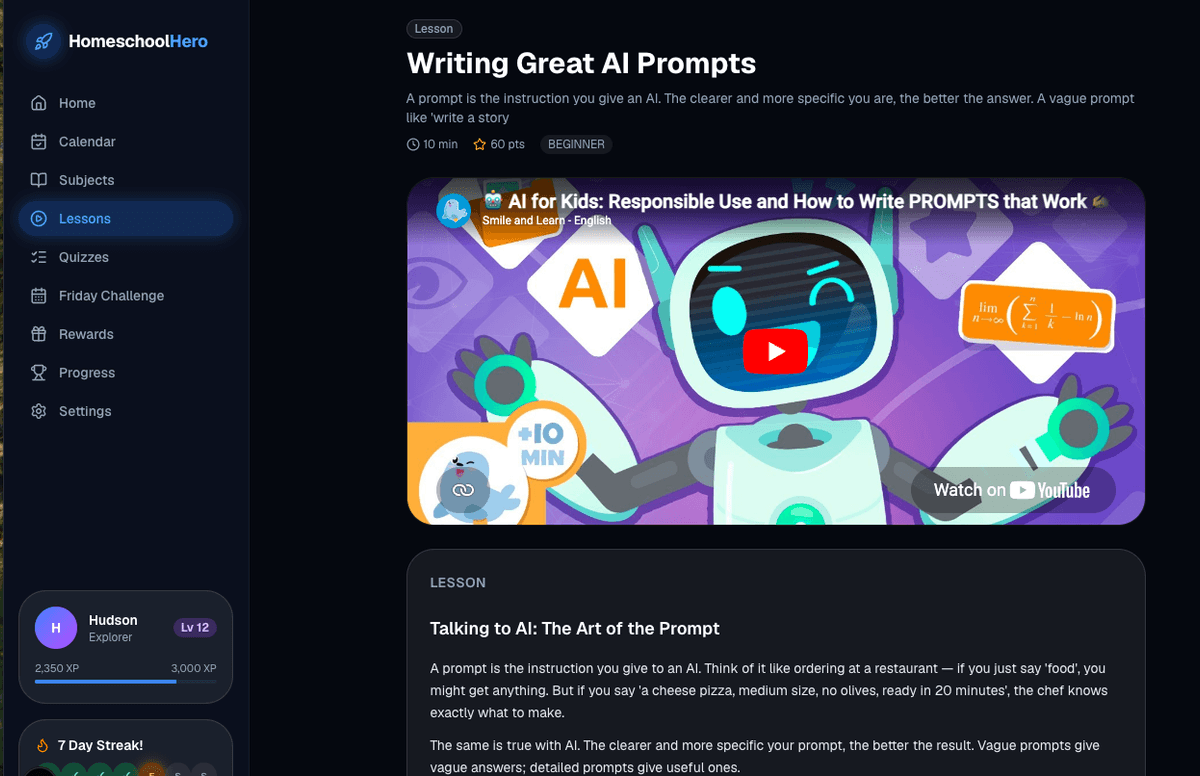
Figure 6: A lesson page with the embedded YouTube player. Watch progress is saved every second and resumes from the exact spot next time.
The video progress piece is quietly the most important part of the whole student experience. If the app cannot reliably remember how much of a lesson was watched, the points, streaks, and Friday quizzes all fall apart. Getting that tracking solid in Phase 3 means the gamification in later phases has a trustworthy foundation.
How We Worked With the Agent
A note on process, because that is half the point of this project. We leaned on the persistent memory file (.agent/memory.md) so the agent keeps context between sessions, what phase we are in, what is blocking us, what the next step is. Before any UI work, the agent read the design skill and the wireframe, so it was matching the mockup rather than inventing its own layout.
We also kept the security-first rules from Part 1: never expose keys, keep secrets server-side, and derive identity from the session rather than from anything the browser sends. The data model and the role checks are built around that from day one.
There were real problems along the way , the MCP auth loop, a fine-grained GitHub token that could read but not write, and the usual scaffolding gremlins.
Each one got diagnosed and worked through rather than worked around silently. That honesty is the whole reason these posts exist.
Where We Are Now
The app runs locally and connects to a live Convex cloud database.
The full Convex schema is live, with eight subjects and 39 topics seeded.
The student dashboard mirrors the design mockup, with all the rows, cards, glows, and the live Friday countdown.
Subject, lesson (with YouTube tracking), quiz, and reward pages all work.
The code is on GitHub as we go, and each phase gets committed when it is verified.
What Comes Next
Phase 4 is the Parent Dashboard, the admin side where I track progress with charts, build lessons manually, manage the reward shop, and export the learning history. After that comes the Friday Challenge system (Phase 5), adaptive difficulty and the Get Help drawer (Phase 6), and the AI lesson builder (Phase 7), where I will ask the agent to research a topic, suggest a video, and draft a whole lesson for my son.
The biggest takeaway from this stage: planning paid off. Because we had the design skill, the wireframe, and the schema decided in advance, the actual build of the dashboard was mostly assembly. The agent was matching a spec, not guessing at a vision ,and that is the difference between an app that feels intentional and one that feels generated.
We will be back with Part 3 once the parent side is built. Thanks for following along.
This is the second in a series of posts. We will keep updating as each phase ships.